
Repairable Product Design for Small Consumer Brands
 TBH Editorial
A product that can’t be opened is a promise to the bin. Small brands can’t afford that kind of waste, not in materials, not in support costs, and not in trust.
The good news is that repairable product design doesn’t belong only to giant manufacturers with deep pockets. If you’re building a kitchen gadget, a personal care device, a lamp, or a smart home accessory, a few choices made early can decide whether a fault becomes a quick fix or a dead product. That’s where the work starts.
TL;DR: Design for repair before tooling, not after complaints. Separate wear parts from the core product, make disassembly simple, publish clear repair guidance, and plan spares and service before launch.
Why repairability gives small brands an edge
Small consumer brands rarely win on scale. You win on focus, trust, and a product people want to keep. Repairability helps with all three.
When a charger port loosens, a seal wears out, or a battery fades, customers don’t judge the failure alone. They judge what happens next. Can they fix it? Can you help? Or do they hit a wall and start shopping elsewhere?
That is why repair-friendly design is not some worthy extra. It is product strategy. A repairable item can cut warranty waste, reduce avoidable returns, and stretch the life of each unit you worked hard to acquire a customer for.
It also changes how honest your sustainability story feels. In 2026, buyers expect durability and transparency as standard. Refillable packs, reusable materials, and clearer packaging all point in the same direction: less waste, more use. If your product is sealed shut and tossed at the first common failure, the rest of the story rings hollow.
There is a catch. A repairable product on its own is not enough. People also need parts, instructions, and a clear path to support. That is why iFixit’s guide to building a repair ecosystem is worth reading. It makes a blunt point: repair works best when the product and the support system are designed together.
You do not need to make every part user-serviceable. That would be silly for some products and risky for others. You do need to make the common failures fixable. Start there.
Build for longevity from the start

The cheapest time to improve repairability is before your CAD files harden into tooling. After that, every bad choice gets expensive.
Start with failure modes. Ask one simple question for each major part: what is most likely to fail first? For many consumer products, the answer is not the main board. It is the battery, switch, cable, pump, seal, hinge, strap, or charging port. Those are your wear parts. Treat them like tyres on a car, not like hidden organs.
If a battery dies after 18 months and the case is welded shut, you did not build durability. You built a timer.
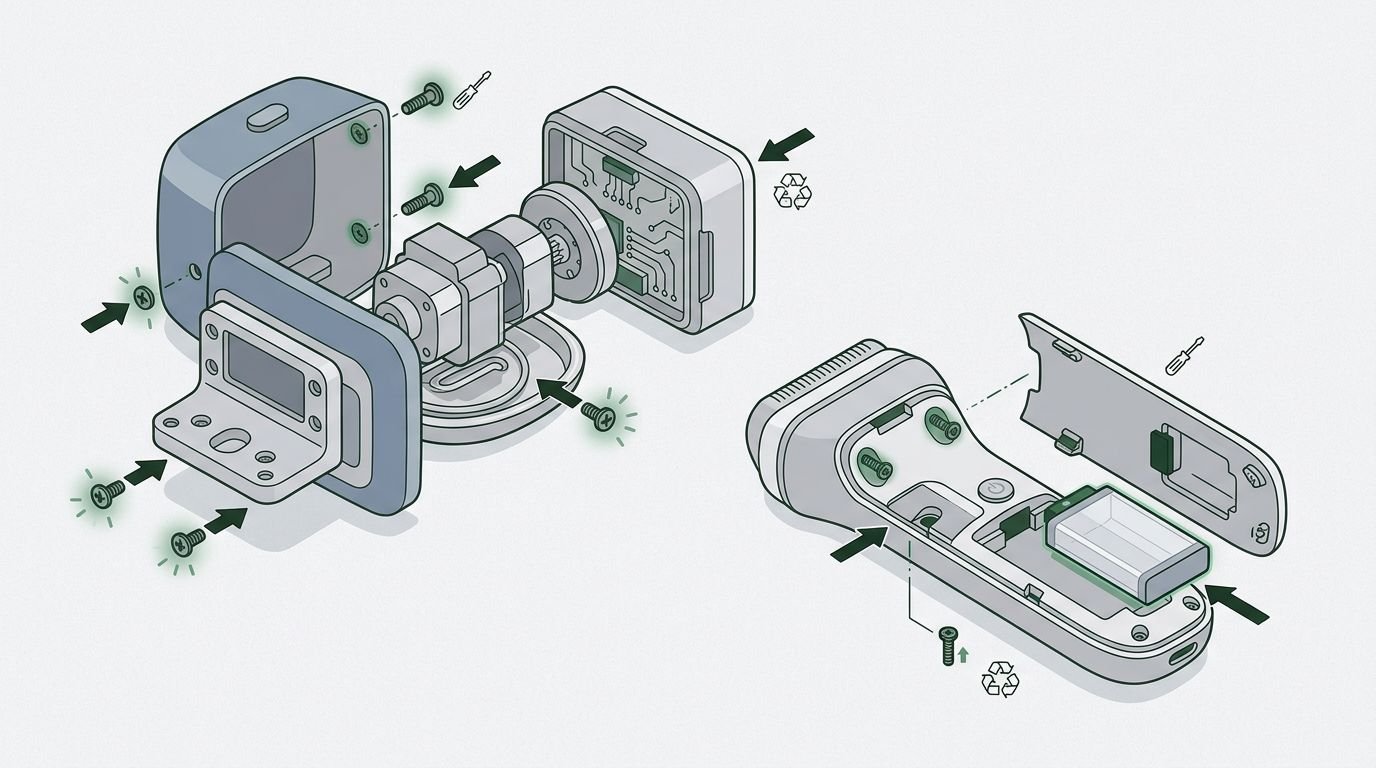
A practical repairable product design keeps wear parts accessible and keeps the main architecture protected. That often means a two-layer approach: a robust outer housing, then sub-assemblies that can be removed without tearing through adhesive or snapping ten plastic clips on the way in.
This quick comparison shows where small design choices matter:
| Design area | Poor choice | Better choice |
|---|---|---|
| Fasteners | Mixed screw types and hidden clips | One or two standard screw types |
| Battery mounting | Permanent glue across the whole cell | Pull tabs, trays, or limited adhesive zones |
| Case joints | Heat-staked or welded seams everywhere | Service seam with screws or replaceable clips |
| Wear-part access | Part buried under core electronics | Part reachable in a few steps |
The point is not purity. The point is service time, damage risk, and repeatability. Your product should survive being opened more than once.
A few rules help almost every category. Use standard fasteners. Leave room for tools. Add cable slack where a technician needs to move a board. Keep connectors keyed and visible. Avoid routing a cheap consumable through the middle of a costly assembly. Test screw bosses and clips for multiple open-close cycles, not one.
If you want a solid reference, Repair in Design’s guidelines are useful because they translate big repair ideas into design choices you can act on. That matters when your team is small and every choice has to pull its weight.
Make disassembly boring and obvious
Good repair design is not flashy. It is boring in the best way. Open product. Reach part. Replace part. Close product. Done.
That boring flow disappears when the first step is unclear. If someone has to pry at random seams or peel cosmetic covers to guess where the fixings are, the product is fighting the repair.
Aim for a clear opening path. One side should read as the service side. Fasteners should be visible or easy to locate. If you need clips, make their release direction obvious and their failure less likely. Brittle clips may look neat in renders. In real life, they are tiny acts of sabotage.
The same goes for internals. Connectors should not require three hands. Delicate cables should not sit right under the first panel. If a board must be moved to replace a cheap part, give it support points and cable length so it can move without strain.
If a first-time opener breaks the product during a basic repair, the problem is the design, not the person.
This is where small teams can be sharper than bigger ones. Run rough service tests early. Hand a prototype to someone who did not design it. Give them the right tool, a timer, and no briefing beyond a short instruction sheet. Watch where they hesitate. Watch what they break. Those moments are gold.
Track simple internal measures: time to first screw, number of tool changes, number of hidden fasteners, number of parts removed before the target part is reached. None of this is glamorous. It is useful, which is better.
Repairable product design is often less about invention and more about removing friction. Friction is what turns a five-minute fix into a refund.
Documentation is your secret weapon
A well-designed product can still fail the customer if the instructions are poor. This happens all the time.

For small brands, documentation is not admin. It is part of the product. The manual, service guide, parts list, and support page are what turn repair from theory into something real.
Keep it plain. Show the opening sequence. State the tool type and size. Mark any fragile areas. Show the order of parts. If torque matters, say so. If adhesive must be replaced after opening, say that too. Nobody enjoys discovering the hidden rule after the device is already apart.
A QR code on the box or underside can help, but it should lead somewhere useful, not a dead-end support form. Think photo guides, short videos, exploded diagrams, spare part identifiers, and a clear answer to a basic question: can I repair this myself, or should this go to a service partner?
That clarity matters more than ever. As the Circular Electronics Design Guide points out, repair support can fail simply because brands do not communicate it well. If people cannot find the guide, the guide may as well not exist.
Internal documentation matters too. Suppliers change. A screw length gets updated. A connector gets swapped. Six months later, support is working from old PDFs and wondering why repairs have turned messy. Keep one live source of truth for parts, revisions, and repair steps. Future you will be grateful.
And please, do not make customers email support to ask what screwdriver they need. Life is short.
Set up a repair system before launch
Repairability is not finished when the hardware is done. You also need a plan for what happens after the sale.
For a small brand, that plan does not need to be huge. It needs to be clear. Decide which repairs are customer-safe, which go to a local repair partner, and which come back to your team. You can build from there.
Start with the top three failure modes you expect. Hold spare parts for those. Write the support flow for those. Train your team on those. If 80 per cent of likely issues come from batteries, seals, and charging parts, that is where your early repair system should live.
A simple pre-launch check helps:
- Can a customer identify the likely fault without guesswork?
- Can they buy the part or access a repair route without chasing support for days?
- Can your team complete the repair without improvising or damaging adjacent parts?
If any answer is no, you have more design work to do.
It is also worth deciding what you will measure. Look at repair rate, repeat failures, turnaround time, and how many returned units get scrapped instead of fixed. Those numbers show whether your product is truly repairable or merely repair-themed.
The strongest small brands do one more thing: they feed repair data back into the next version. That broken latch, that frayed cable, that cracked boss near the screw post, it is all design information. Waste it, and you pay for it twice.
Conclusion
A product that lasts is good. A product that can be fixed is better. That is the difference between durability as a claim and repairability as a system.
Small brands do not need perfection here. You need honesty, smart architecture, and a support path that respects the customer’s time. Build the product so common failures are fixable, then back that up with parts and clear guidance.
If your brand wants to reduce waste beyond its own products, you can also Contribute to Active Missions. Repair starts with design, but it should not stop at the factory gate.